
Let End Customers connect your application to their Xyte account with OAuth2 and OpenID Connect.
Xyte OAuth2 lets a third-party application act on an End Customer's Xyte account without handling API keys. Your application sends the user to Xyte, the user signs in and approves the connection, and your application receives tokens for the Organization Core API (the End Customer API documented at docs.xyte.io). Xyte implements the OAuth 2.0 authorization code grant with PKCE (RFC 6749, RFC 7636), refresh token rotation, token revocation (RFC 7009) and OpenID Connect for user identity.
All OAuth2 endpoints live on https://hub.xyte.io, outside the /core/v1/organization API prefix.
| Endpoint | Purpose |
|---|---|
GET /oauth/authorize | Starts the browser flow. |
POST /oauth/token | Exchanges an authorization code or a refresh token for tokens. |
POST /oauth/revoke | Revokes the tokens issued to the authorization the token belongs to. |
GET /oauth/userinfo | Returns the signed-in user's identity (OpenID Connect). Also accepts POST. |
GET /.well-known/openid-configuration | OpenID Connect discovery document. |
GET /oauth/.well-known/jwks.json | Public keys for verifying id_token signatures. |
One flow, one level of access
There is a single flow, and it works the same way for every End User. What separates is identity from authority:
| Comes from | What you get | |
|---|---|---|
| Authority | The End Customer that the user picks on the consent screen | An access token with the same reach as an Organization Core API key. Every access and refresh token is issued against the End Customer's grant. |
| Identity | The person who signed in | An id_token, and a GET /oauth/userinfo response, describing that person — whenever you request the openid scope. |
The reach of an access token never depends on who signed in. An administrator and an ordinary member of the same End Customer receive tokens with identical access; only the identity in the id_token differs. Build your feature set around what the End Customer can do, not around the signed-in user's role.
An End Customer has to be approved once by one of its administrators before your application can act on it. That approval settles two things at once: the access every token carries, and who may sign in through the connection. The administrator picks a sign-in policy for it — anyone with access to the End Customer (the default), the members of one of its groups, or its administrators only — so "any End User can sign in" holds under the default and narrows from there. An administrator of the End Customer is always admitted, whatever the policy. The consent screen shows every End Customer a user can reach and says which of them they may approve or sign in to; see "What the user sees" below.
The policy is fixed when the connection is created, and there is no edit for it: an administrator who wants to change it revokes the connection under Settings → Connected apps and approves your application again. So an End User who signed in yesterday can be refused today because an administrator narrowed the policy. There is no new error for you to handle — the consent screen simply will not let that user pick the End Customer, so no code is issued and nothing comes back to your redirect URI. Tokens already issued are untouched by a later policy choice; only a revoke kills those.
Typical uses — a back-end integration that syncs Devices, Spaces or Incidents for a whole End Customer, and "Sign in with Xyte" for individual users of your product — are served by this one flow. Add openid to the scope when you need the user's identity; leave it out when you only need API access.
Register your application
Client registration is handled by Xyte in v1; there is no self-service form. Send Xyte:
- The application name. Users see it on the consent screen, and End Customers see it in their API Call Log and under Connected apps.
- The Partner that owns the application. Users approve the connection on that Partner's Customer Portal domain.
- Every redirect URI your application uses, in full. The authorization endpoint matches
redirect_uribyte for byte, sohttps://app.example.com/callbackandhttps://app.example.com/callback/are different URIs.
Xyte returns a client_id and a client_secret out of band. The secret is stored hashed and is never shown again; if you lose it or it leaks, ask Xyte to rotate it. Keep the secret on your server. Never ship it in a mobile or single-page application.
Tokens are opaque strings with a type prefix: xoac_ for authorization codes, xoat_ for access tokens and xort_ for refresh tokens. Do not parse them; the prefix only tells the token types apart.
A working sample application
Before writing your own client, run the one Xyte maintains: xyte-io/xyte-oauth2-demo. It is a complete third-party application — "Acme Fleet Portal" — in plain commented JavaScript, with no dependencies beyond Node 18.17+, and it implements every step of this guide: PKCE, the authorization redirect, the code exchange, id_token verification against the JWKS, /oauth/userinfo, refresh with rotation, replay of a rotated refresh token, and revocation.
git clone https://github.com/xyte-io/xyte-oauth2-demo && cd xyte-oauth2-demo
cp .env.example .env      # XYTE_HUB, and the client_id / client_secret Xyte issued you
node server.js            # http://localhost:5555
Point XYTE_HUB at https://hub.xyte.io and REDIRECT_URI at the URI Xyte registered for you, and the demo runs the real flow against your own application. Its dashboard shows what your client receives, with the id_token checked claim by claim:
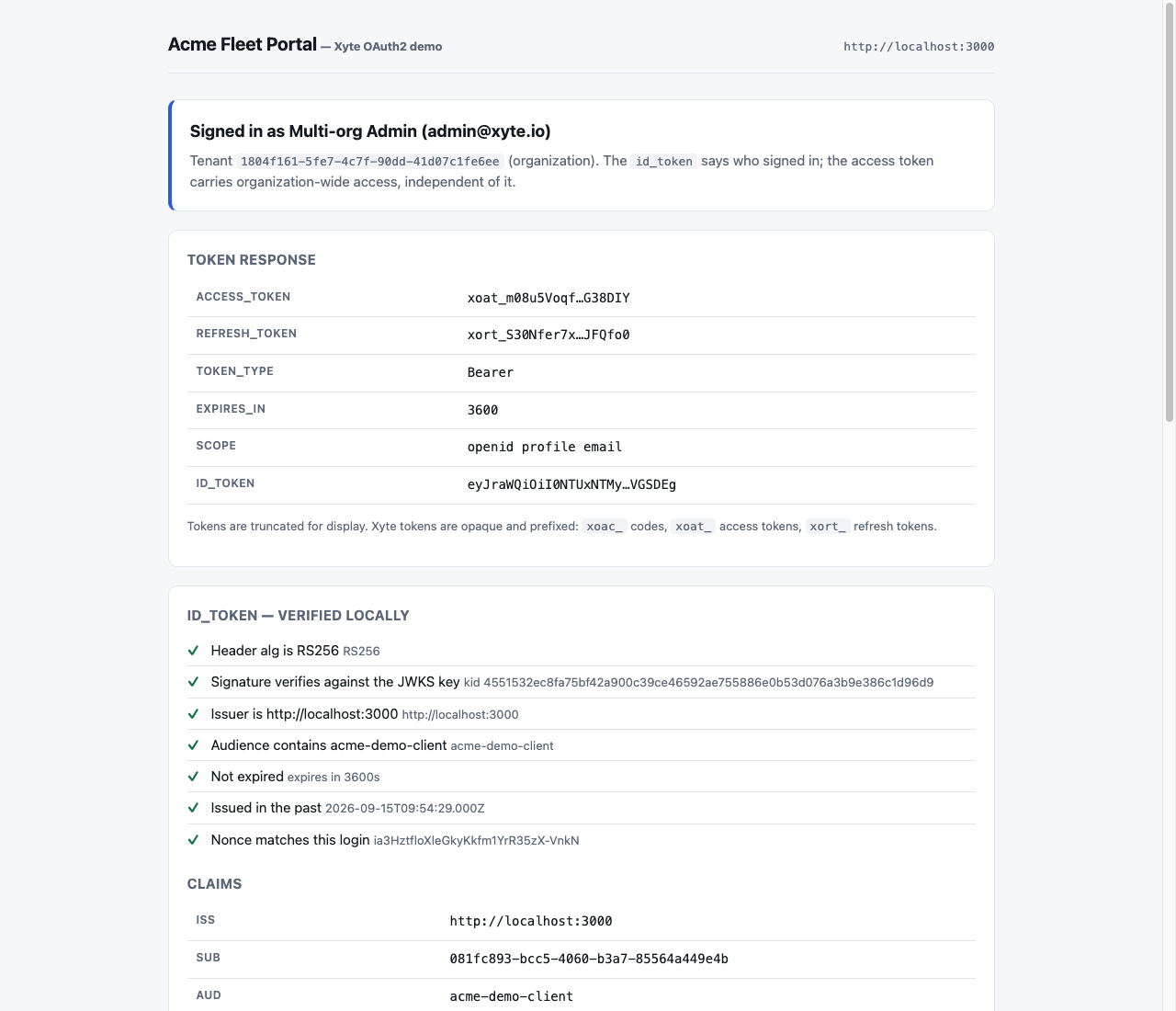
Read it as a reference implementation rather than a starting template: sessions are in memory and tokens are rendered in the browser, so run it locally only.
Step by step
This walkthrough uses https://app.example.com/oauth/callback as the registered redirect URI and curl for the server-side calls.
1. Create a PKCE verifier and challenge
Generate a fresh code_verifier for every authorization request and keep it on your server until the code exchange. The challenge is base64url(SHA-256(code_verifier)) without padding.
code_verifier=$(openssl rand -hex 32)
code_challenge=$(printf '%s' "$code_verifier" \
  | openssl dgst -sha256 -binary \
  | openssl base64 -A | tr '+/' '-_' | tr -d '=')
Generate an unguessable state value the same way and store it with the verifier (and with the nonce, if you request openid), keyed by the user's browser session.
2. Send the user to the authorization endpoint
GET /oauth/authorize?response_type=code&client_id=YOUR_CLIENT_ID&redirect_uri=https%3A%2F%2Fapp.example.com%2Foauth%2Fcallback&state=1f7c2d8e9a4b&code_challenge=E9Melhoa2OwvFrEMTJguCHaoeK1t8URWbuGJSstw-cM&code_challenge_method=S256&scope=openid%20profile%20email&nonce=8b1e4c6d HTTP/1.1
Host: hub.xyte.io| Parameter | Required | Value |
|---|---|---|
response_type | Yes | code. |
client_id | Yes | Your client id. |
redirect_uri | Yes | One of your registered redirect URIs, byte for byte. |
state | Yes | Opaque value bound to the browser session, at most 512 characters. Echoed back on the redirect. |
code_challenge | Yes | base64url(SHA-256(code_verifier)). |
code_challenge_method | Yes | S256. plain is rejected. |
scope | No | Space-separated subset of openid profile email. Any other value fails with invalid_scope. Omit it if you only need API access and never need to identify the user. |
nonce | Recommended with openid | Random value of at most 512 characters, echoed in the id_token. Verify it on return. |
The endpoint validates client_id, redirect_uri and the length of state first. If client_id is unknown or the application is disabled (invalid_client), if redirect_uri is missing or unregistered, or if state is longer than 512 characters (invalid_request), Xyte shows a 400 error page and never redirects to the unverified URI. If the Partner that owns your application has no Customer Portal domain to host the consent screen, the error page is a 500 server_error. Otherwise it responds 302 to the consent screen on the Customer Portal domain of the Partner that owns your application, carrying the same query string. Any later validation error comes back to your redirect URI; see the OAuth2 error reference.
3. Handle the callback
After the user approves, the browser arrives at your redirect URI with a single-use code that expires in 60 seconds:
HTTP/1.1 302 Found
Location: https://app.example.com/oauth/callback?code=xoac_...&state=1f7c2d8e9a4b
If the user declines, the redirect carries an error instead:
HTTP/1.1 302 Found
Location: https://app.example.com/oauth/callback?error=access_denied&state=1f7c2d8e9a4b
On every callback:
- Look up the browser session and compare
statewith the stored value. Reject the callback on any mismatch and do not exchange the code. - If
erroris present, stop and show the user a message. Anaccess_deniedthat also carrieserror_reasonmeans the user had no End Customer to pick; show them theerror_description. See the OAuth2 error reference. - Exchange the code immediately. It is valid once, for 60 seconds.
4. Exchange the code for tokens
Authenticate with HTTP Basic, using client_id as the username and client_secret as the password (both form-url-encoded before Base64 encoding, per RFC 6749 section 2.3.1). The body must be application/x-www-form-urlencoded; a JSON body is rejected with invalid_request.
POST /oauth/token HTTP/1.1
Host: hub.xyte.io
Authorization: Basic <base64(client_id:client_secret)>
Content-Type: application/x-www-form-urlencoded

grant_type=authorization_code&code=xoac_...&redirect_uri=https%3A%2F%2Fapp.example.com%2Foauth%2Fcallback&code_verifier=3f9a...
The same request with curl:
curl --request POST https://hub.xyte.io/oauth/token \
  --user "$CLIENT_ID:$CLIENT_SECRET" \
  --data-urlencode "grant_type=authorization_code" \
  --data-urlencode "code=$CODE" \
  --data-urlencode "redirect_uri=https://app.example.com/oauth/callback" \
--data-urlencode "code_verifier=$code_verifier"| Parameter | Required | Value |
|---|---|---|
grant_type | Yes | authorization_code. |
code | Yes | The code from the callback. |
redirect_uri | Yes | The exact redirect_uri used in step 2. |
code_verifier | Yes | The verifier from step 1. |
Alternatively, send client_id and client_secret as body parameters (client_secret_post). Do not combine both methods with different client ids; the request fails with invalid_request.
Response:
{
  "access_token": "xoat_...",
  "token_type": "Bearer",
  "expires_in": 3600,
  "refresh_token": "xort_...",
  "scope": "openid profile email",
  "id_token": "eyJhbGciOiJSUzI1NiIsImtpZCI6Ii4uLiJ9..."
}| Field | Present | Meaning |
|---|---|---|
access_token | Always | Bearer token for the Organization Core API. Valid for 60 minutes. |
token_type | Always | Bearer. |
expires_in | Always | Access token lifetime in seconds (3600). |
refresh_token | Always | Use it once to obtain the next token pair. Expires 90 days after this exchange. |
scope | Only when you requested OpenID Connect scopes | The granted scopes. |
id_token | Whenever openid was requested | Signed JWT with the identity of the user who signed in. |
Token responses carry Cache-Control: no-store and Pragma: no-cache. Store the refresh token encrypted at rest and keep the access token in memory as a short-lived secret.
5. Call the Organization Core API
Send the access token as a bearer token. Paths, parameters and responses are the same as with an API key; only the Authorization header changes.
GET /core/v1/organization/info HTTP/1.1
Host: hub.xyte.io
Authorization: Bearer xoat_...curl https://hub.xyte.io/core/v1/organization/info \
--header "Authorization: Bearer $ACCESS_TOKEN"The response is the same as for Get Organization Info with an API key. Every call appears in the End Customer's API Call Log under your application name, and under the user who signed in.
6. Refresh the access token
When the access token expires, or the API answers 401, post the refresh token to the token endpoint with the same client authentication:
curl --request POST https://hub.xyte.io/oauth/token \
  --user "$CLIENT_ID:$CLIENT_SECRET" \
  --data-urlencode "grant_type=refresh_token" \
  --data-urlencode "refresh_token=$REFRESH_TOKEN"
The response has the same shape as the code exchange and always contains a new refresh_token. The old refresh token is dead as soon as the new one is issued. When the grant includes openid, a new id_token is included as well (without a nonce). Persist the new refresh token before you use the new access token. The rotation section below explains what happens if you reuse an old one.
7. Revoke when the user disconnects
When a user disconnects your application or deletes their account with you, revoke the tokens so they stop working immediately:
curl --request POST https://hub.xyte.io/oauth/revoke \
  --user "$CLIENT_ID:$CLIENT_SECRET" \
  --data-urlencode "token=$REFRESH_TOKEN" \
  --data-urlencode "token_type_hint=refresh_token"
The endpoint answers 200 with an empty body. The revocation section below has the details.
What the user sees
The consent screen runs on the Customer Portal of the Partner that owns your application, under the title Authenticate your application name.
-
Sign-in. The user signs in with their Customer Portal credentials, or continues an existing session. The screen then names whoever that session belongs to, above the list, with a Not you? link that signs them out and returns to the same authorization request — the identity shown there is the one your
id_tokenwill carry. -
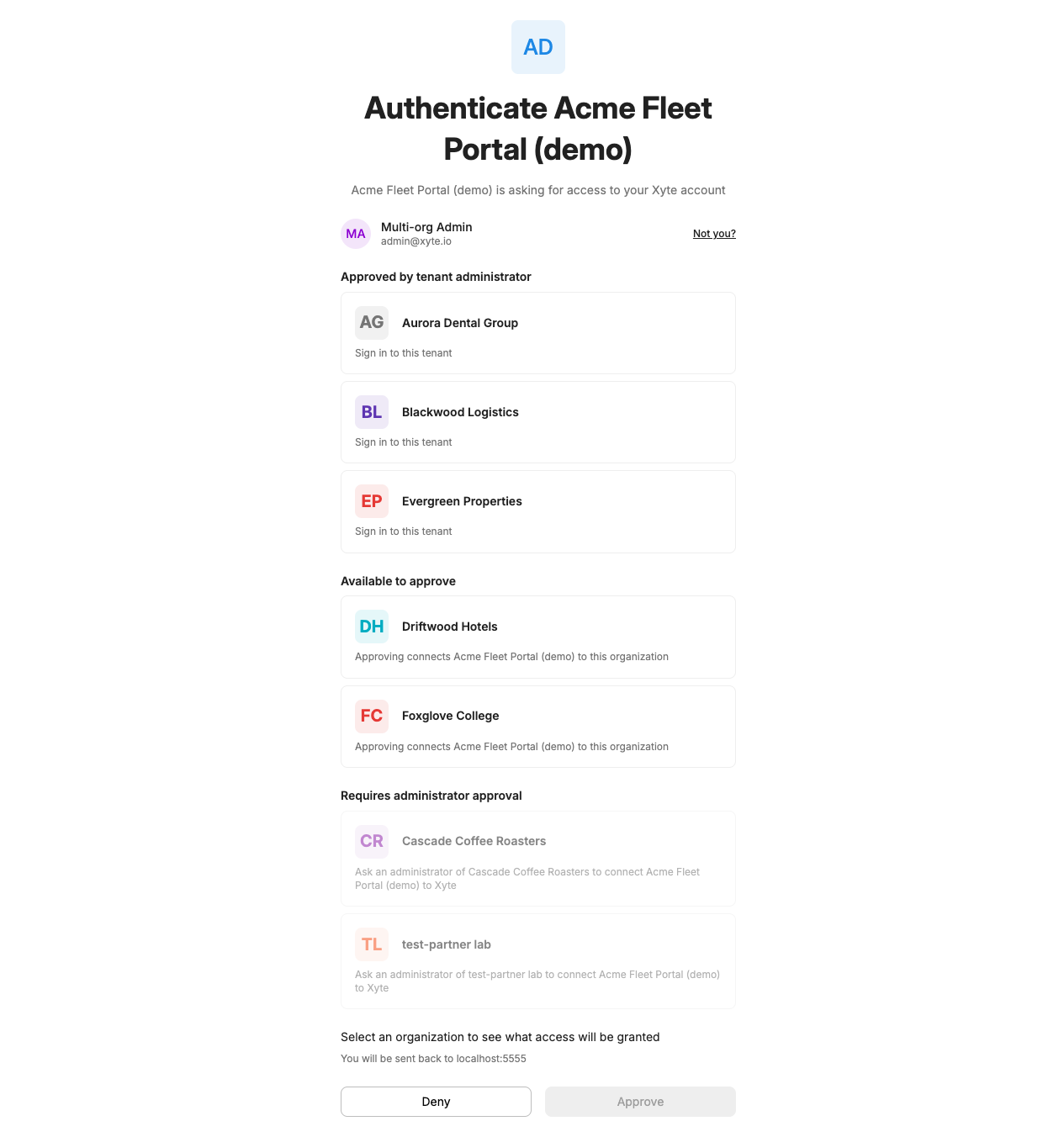
Tenant picker. The screen lists every End Customer the user can reach — nothing is filtered out — annotated with whether the user may approve it and whether your application is already approved for it. The list comes in three groups:
-
Approved by tenant administrator — an administrator has already approved your application here. Selectable; each row is hinted Sign in to this tenant.
-
Available to approve — End Customers the user administers, where your application is not approved yet. Selectable; picking one approves your application for that End Customer.
-
Requires administrator approval — End Customers the user can neither approve nor sign in to: your application is not approved there and the user does not administer it, or it is approved but its sign-in policy leaves the user out. Listed so the user can see them, but not selectable.
-
-
Sign-in policy. Shown only when the picked End Customer is not connected yet. Nothing is preselected and Approve stays disabled until the administrator chooses, so the widest setting is never reached by clicking through.
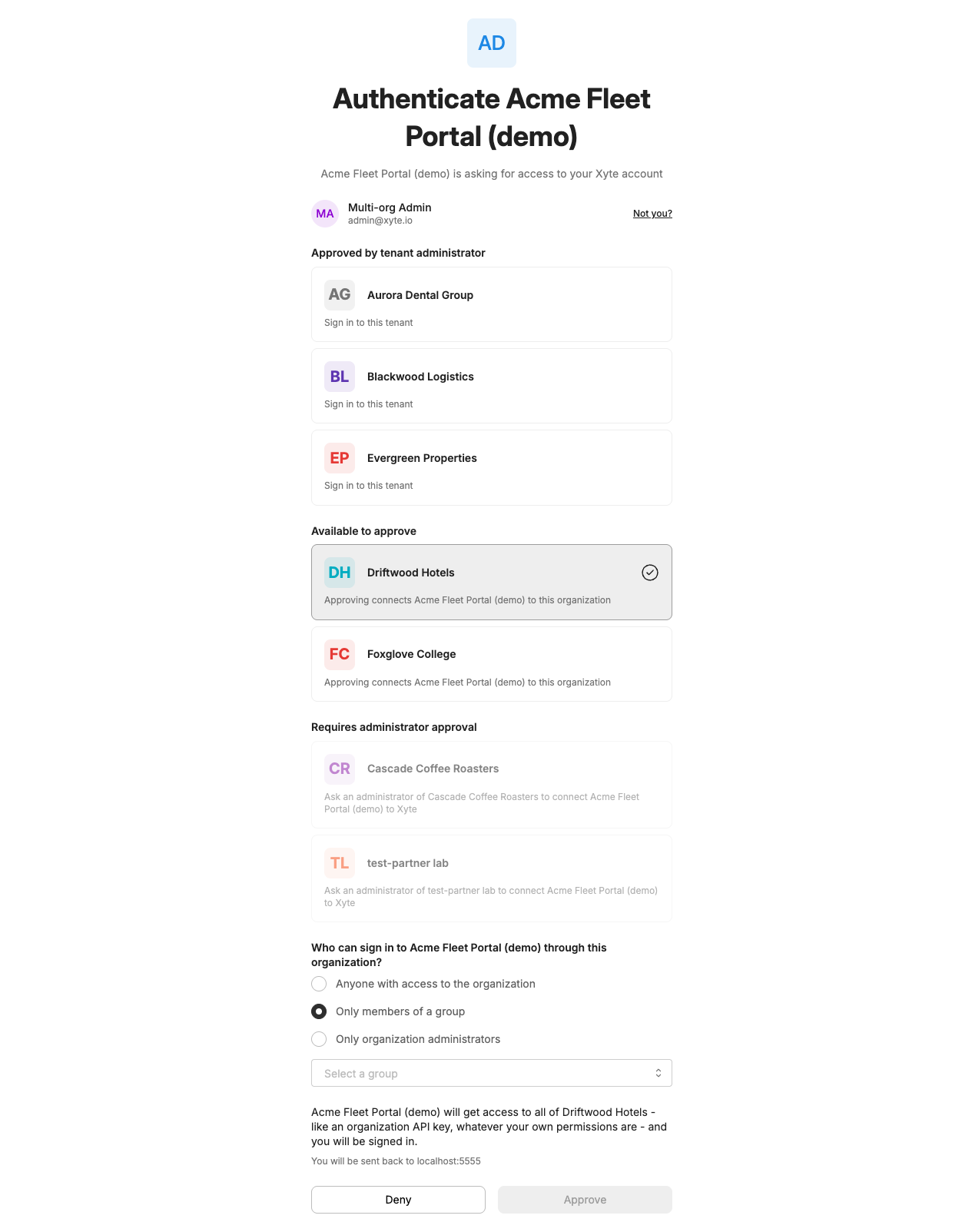
The administrator answers Who can sign in to your application name through this organization?, choosing Anyone with access to the organization (the default), Only members of a group — and then the group — or Only organization administrators. An End Customer that is already connected keeps the policy chosen when it was connected; this step is not shown for it.
-
Approve. The user reviews the request and submits. The button reads Continue for an End Customer that is already approved, and Approve otherwise.
-
Redirect. On approval the browser returns to your redirect URI with
codeandstate. On decline it returns witherror=access_deniedandstate, pluserror_reasonanderror_descriptionwhen the user had nothing to pick (see below).
Whichever End Customer the user picks, the code and the tokens are issued against that End Customer's grant — the user's own role in the Customer Portal changes nothing about them. That role does decide whether they may pick it at all, though: a row is selectable only for an administrator of that End Customer, or for a user the connection's sign-in policy admits.
Users with nothing to pickAn End Customer shows up under Requires administrator approval, greyed out, in two cases: nobody has approved your application there and the user does not administer it, or it is approved but its sign-in policy — one group, or administrators only — leaves the user out. A user with nothing else on the screen cannot continue and no code is issued. Their only option, Deny, returns
error=access_deniedwith anerror_reasonoforg_not_approved,user_not_allowedorno_organization. See the OAuth2 error reference for what each one means. Tell such users to ask an administrator of that End Customer to approve your application, or to let them in; from then on they sign in like anyone else.
Token lifetimes
| Token | Lifetime | Notes |
|---|---|---|
| Authorization code | 60 seconds | Single use. Exchange it immediately. |
| Access token | 60 minutes | expires_in is 3600. |
| Refresh token | 90 days from the original code exchange | Absolute, not sliding. Every refresh issues a new refresh token with the same expiry. After 90 days the user must authorize again. |
id_token | 60 minutes | exp is iat plus 3600. |
Refresh token rotation and replay
Every refresh rotates the token: the response carries a new refresh token and the previous one is invalidated. Reusing an already-rotated refresh token is treated as a possible theft:
- Within 60 seconds of the rotation, Xyte treats the reuse as a retried request whose response was lost. The token endpoint answers
400 invalid_grantand nothing else changes. - After 60 seconds, Xyte revokes the whole grant: every access token, refresh token and pending code your application holds for that End Customer, including those obtained by its other users. An audit event is recorded. Users have to go through authorization again.
To stay out of the second case, persist the new refresh token before you use it, run one refresh at a time per grant, and never share a refresh token between processes without coordination.
What an access token can do
Every access token behaves exactly like an Organization Core API key, whoever signed in to obtain it:
- Devices, Spaces, assets, Incidents, Tickets, notes and Commands cover the whole End Customer. Nothing is filtered by the signed-in user's own Customer Portal access.
- The endpoints that only an administrator can use in the portal —
/core/v1/organization/users,/core/v1/organization/groups, Device merge and split — answer200for any OAuth2 access token. - Paths, parameters and response shapes are identical to API-key calls, so the same client code serves an API key and an access token.
Because every token has the same reach, never key your application's behaviour off the signed-in user's role: two users of the same End Customer see exactly the same data through your application. Use the id_token to learn who is using it, and the access token for what it may do. The connection's sign-in policy decides who may obtain a token at all; it never changes what a token, once issued, can reach.
OpenID Connect
Request the openid scope (plus profile, email or both) to receive an id_token, and use it to identify the user in your product. It is issued for every sign-in that asks for openid, including an administrator's.
Discovery and keys
GET /.well-known/openid-configuration HTTP/1.1
Host: hub.xyte.io{
"issuer": "https://hub.xyte.io",
"authorization_endpoint": "https://hub.xyte.io/oauth/authorize",
"token_endpoint": "https://hub.xyte.io/oauth/token",
"userinfo_endpoint": "https://hub.xyte.io/oauth/userinfo",
"jwks_uri": "https://hub.xyte.io/oauth/.well-known/jwks.json",
"response_types_supported": ["code"],
"grant_types_supported": ["authorization_code", "refresh_token"],
"subject_types_supported": ["public"],
"id_token_signing_alg_values_supported": ["RS256"],
"scopes_supported": ["openid", "profile", "email"],
"token_endpoint_auth_methods_supported": ["client_secret_basic", "client_secret_post"],
"code_challenge_methods_supported": ["S256"],
"claims_supported": ["iss", "sub", "aud", "exp", "iat", "nonce", "email", "name", "xyte_tenant_id", "xyte_tenant_type"]
}The discovery document is cacheable for 1 hour. It does not advertise a revocation_endpoint yet; use POST /oauth/revoke as described on this page.
Signing keys:
GET /oauth/.well-known/jwks.json HTTP/1.1
Host: hub.xyte.io{
"keys": [
{ "kty": "RSA", "use": "sig", "alg": "RS256", "kid": "...", "n": "...", "e": "AQAB" }
]
}Cache the JWKS for up to 5 minutes and refetch it when you meet an unknown kid.
The discovery document and the JWKS each accept 120 requests per minute per IP address; above that they answer 429. Honor the cache lifetimes above rather than fetching them on every sign-in.
Claims in the id_token
The id_token is a JWT signed with RS256. Decoded payload:
{
  "iss": "https://hub.xyte.io",
  "sub": "7c9e6679-7425-40de-944b-e07fc1f90ae7",
  "aud": "YOUR_CLIENT_ID",
  "exp": 1757600000,
  "iat": 1757596400,
  "nonce": "8b1e4c6d",
  "email": "[email protected]",
  "name": "Dana Levi",
  "xyte_tenant_id": "3f2504e0-4f89-41d3-9a0c-0305e82c3301",
  "xyte_tenant_type": "organization"
}| Claim | Scope | Value |
|---|---|---|
iss | openid | https://hub.xyte.io. |
sub | openid | The user's Xyte id, a UUID string. Stable across sign-ins; use it as the user key. |
aud | openid | Your client_id. |
iat, exp | openid | Issued-at time and expiry (iat plus 3600 seconds). |
nonce | openid | The nonce from the authorization request. Present only in the token from the code exchange, not in refreshed tokens. |
email | email | The user's email address. |
name | profile | The user's display name. |
xyte_tenant_id | openid | Id of the End Customer the user signed in to, a UUID string. |
xyte_tenant_type | openid | Always organization. |
Verify the id_token
- Read
kidfrom the JWT header and pick the matching key from the JWKS. - Verify the RS256 signature.
- Check that
issequalshttps://hub.xyte.ioandaudequals yourclient_id. - Check that
expis in the future, allowing a small clock skew. - On the code exchange, check that
nonceequals the value you stored in step 1 of the walkthrough.
Reject the sign-in on any failed check. Use a maintained JWT library rather than hand-rolled verification.
Userinfo
GET /oauth/userinfo HTTP/1.1
Host: hub.xyte.io
Authorization: Bearer xoat_...{
"sub": "7c9e6679-7425-40de-944b-e07fc1f90ae7",
"email": "[email protected]",
"name": "Dana Levi",
"xyte_tenant_id": "3f2504e0-4f89-41d3-9a0c-0305e82c3301",
"xyte_tenant_type": "organization"
}POST /oauth/userinfo is accepted as well (OpenID Connect Core 5.3.1): send the same Authorization header with an application/x-www-form-urlencoded body, which may be empty. The response is identical.
email and name follow the granted scopes. sub and xyte_tenant_id are UUID strings. The endpoint answers for any access token whose authorization requested the openid scope, no matter whether an administrator or an ordinary member signed in; it describes the person who signed in. A token whose authorization did not request openid gets 403 insufficient_scope. Responses carry Cache-Control: no-store.
Revocation
From your application
POST /oauth/revoke follows RFC 7009. It takes the same client authentication and application/x-www-form-urlencoded body as the token endpoint.
| Parameter | Required | Value |
|---|---|---|
token | Yes | An access token or refresh token. Every token issued to the same authorization is revoked. |
token_type_hint | No | Accepted and ignored; the token prefix identifies the type. |
Revoking any token revokes every access token, refresh token and pending authorization code issued to the same authorization. The grant itself stays in place; sending the user through /oauth/authorize again issues fresh tokens.
Revocation is token-only: it does not touch the End Customer's approval of your application. That is why re-authorizing works straight away, without asking an administrator again. Withdrawing the approval itself is done by an End Customer administrator under Settings → Connected apps in the Customer Portal.
The endpoint always answers 200 with an empty body, including for unknown, expired and already-revoked tokens and for tokens issued to another client. Only a malformed request (400 invalid_request: token is missing, the body is not application/x-www-form-urlencoded, or client credentials were sent both in the Authorization header and in the body with different values) or bad client credentials (401 invalid_client) fail.
From the Customer Portal
End Customer administrators see connected applications under Settings → Connected apps in the Customer Portal, along with the sign-in policy each one carries, and can revoke them there.
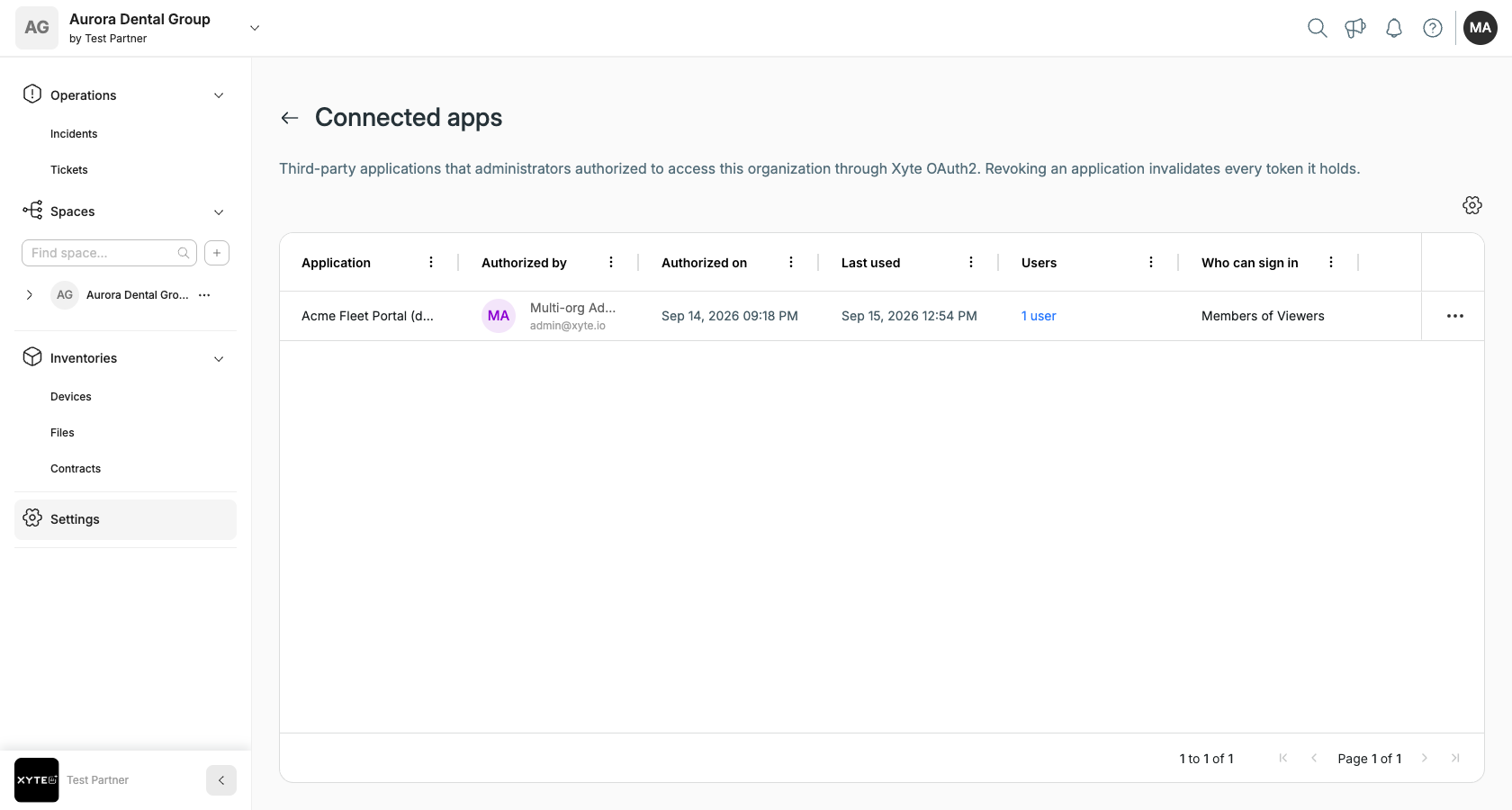
Revoking and approving again is also how an administrator changes that policy — there is no way to edit it in place. Revoking withdraws the approval and kills every token your application holds for that End Customer, whichever of its users obtained them. Its users then land under Requires administrator approval on the consent screen until an administrator approves your application again. Xyte can also disable an application entirely. Disabling revokes all of its grants, and while it is disabled the token and revocation endpoints answer 401 invalid_client. The grants stay revoked after the application is re-enabled, so refreshes fail with invalid_grant and every End Customer has to connect again.
What to do on 401
A 401 from the Organization Core API with WWW-Authenticate: Bearer error="invalid_token" means the access token is expired, revoked or not recognized:
- Refresh once with the stored refresh token.
- If the refresh fails with
invalid_grant, the grant is gone: revoked by the End Customer, by you or by a replay, or expired after 90 days. Delete the stored tokens and ask the user to connect again. - Do not retry the original request in a loop. One refresh attempt per
401is enough.
Rate limits
| Endpoint | Limit |
|---|---|
POST /oauth/token | 60 requests per minute per IP address, 300 per minute per client_id. |
POST /oauth/revoke | 60 requests per minute per IP address. |
GET /oauth/userinfo and POST /oauth/userinfo | 120 requests per minute per IP address. |
GET /.well-known/openid-configuration | 120 requests per minute per IP address. |
GET /oauth/.well-known/jwks.json | 120 requests per minute per IP address. |
| Consent screen (browser) | 30 requests per minute per user. |
Requests over the limit get 429 with the JSON body {"error":"Too many requests"} and no Retry-After header; bring your own backoff and retry later. Access tokens last 60 minutes, so a well-behaved integration refreshes each grant about once an hour; do not refresh ahead of need.
Security requirements
- PKCE with
S256is mandatory on every authorization request.plainis rejected. redirect_urimust match a registered URI byte for byte. Register every variant you use.stateis required. Bind it to the browser session and verify it on every callback.- Use HTTPS for redirect URIs and for every call to Xyte.
- Keep
client_secreton your server. Never embed it in browser or mobile code. - Store refresh tokens encrypted at rest and limit access to the service that needs them.
- Never put tokens in URLs, query strings or logs. Send them in the
Authorizationheader or the request body only. - Verify
id_tokensignatures and claims before trusting them. - Revoke tokens when a user disconnects or deletes their account with you.
Errors
Every error object, status code and header is listed in the OAuth2 error reference.